
We use cookies to enhance your user experience. By clicking ‘Accept’, you agree to store cookies on your device. Find our Privacy Policy.

The ultimate
UCAT practice platform
Built by experts to replicate the real UCAT exam experience, with authentic questions, realistic mock exams, and the tools you'll use on test day.

Testimonials
Listen to what our Quesmed community have to say!
Practice questions
Comprehensive UCAT Practice Questions
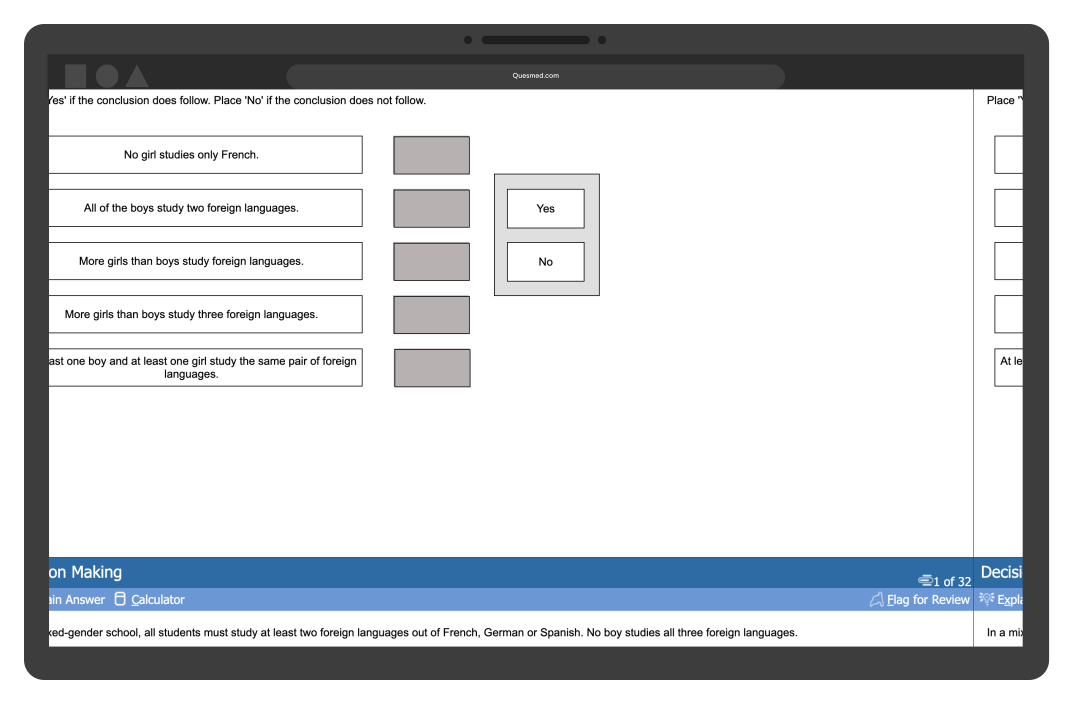
Master every UCAT question type
Master every section of the UCAT with in-depth examples of each question format, designed to build the key skills needed for Verbal Reasoning, Decision Making, Quantitative Reasoning, and Situational Judgement.
20,000+ questions designed by doctors
All our questions are crafted by experienced doctors to reflect the challenges of the real UCAT. Gain expert insights with detailed explanations that help you understand the reasoning behind every answer.
Familiarize yourself with the real UCAT format
Thousands of expert-written questions that closely reflect the real UCAT. Designed by real doctors to test key skills and improve your reasoning, ensuring you're fully prepared for every question type.
Mock exams
How Quesmed Prepares You for the UCAT

Prepare — 20,000+ expert UCAT practice questions
Thousands of expert-written questions that closely reflect the real UCAT. Designed by real doctors to test key skills and improve your reasoning, ensuring you're fully prepared for every question type.

Practice — Realistic UCAT mock exams under timed conditions
Realistic mock tests that fully replicate the UCAT format, ensuring nothing feels unfamiliar on exam day. Timed exams mirror real test conditions, helping you build confidence, improve time management, and refine your test-taking strategies.

Analyse — In-depth UCAT performance tracking
Track progress with in-depth performance insights to focus revision and maximise your score. Identify your strengths and weaknesses with detailed analytics, so you can target your study where it matters most.
Mock exams
Realistic UCAT Mock Exams — Full-Length and UCATSEN Supported
Step into the UCAT with confidence! Our timed mock exams replicate the actual exam format, tools, and layout. With UCATSEN adjustments and an offline app, you can practice anytime, anywhere under exam conditions that suit you.
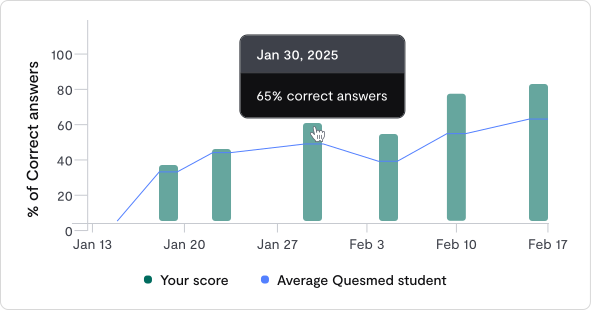
Fully offline app
Access mocks, track progress, and review explanations anywhere - even without an internet connection.
UCATSEN adjustments
Adjust test conditions to support your needs, ensuring a fair and accurate practice experience.
Full-length mocks
Take full mock exams with expert-written questions and detailed explanations to refine your approach.
Authentic experience
Practice with the same layout, tools, and functionality as the real UCAT and avoid surprises on test day.
Performance tracking
Track Your UCAT Progress and Target Your Weaknesses
Take charge of your UCAT preparation with advanced performance tracking. Get clear insights into your progress, pinpoint strengths and weaknesses, and focus your revision where it counts.
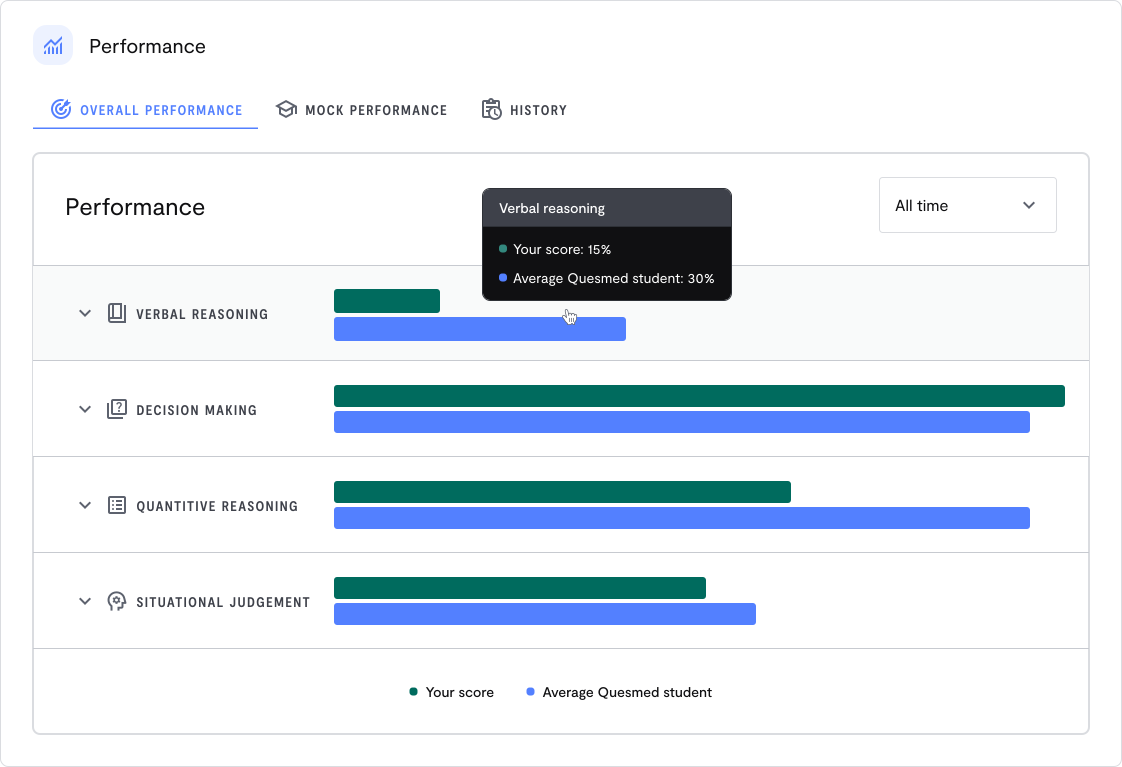

Comprehensive progress tracking across all UCAT sections
Monitor your progress across all UCAT sections with detailed score breakdowns and visual insights.

Goal-based milestones to keep your UCAT revision on track
Set measurable goals and track progress to turn challenges into strengths.

In-depth sectional analysis — Verbal Reasoning, Decision Making and more
Gain a detailed breakdown of your performance across all UCAT sections, providing insights into each key area.

Focused learning insights and personalised recommendations
Receive personalised recommendations to strengthen weak areas and boost your score.
Mock exams
The only fully offline UCAT revision tool
Our bespoke smartphone app makes UCAT preparation seamless and effective. Designed by expert educators and in-house developers, it allows you to study smarter, whether you're online or offline.



Optimised for All Devices
Receive targeted recommendations to turn weak areas into strengths.
True Offline Mode
Download questions and mock exams to prepare without internet access.
Plans
UCAT Preparation Plans — Try For Free, No Commitment
At Quesmed, we believe medical school should be accessible to all.
Our team of real doctors is dedicated to providing high-quality UCAT preparation at an affordable price, ensuring every aspiring medic has the resources they need to succeed.

Most popular

Monthly Plan
Most flexible for consistent progress
£6.25/week
Billed monthly


FAQ
Frequently Asked Questions
The UCAT (University Clinical Aptitude Test) is a standardised admissions test used by the majority of UK medical and dental schools. It evaluates cognitive skills, logical reasoning, and professional judgement rather than scientific knowledge — assessing whether you have the aptitude to succeed in a clinical career.
The test is entirely computer-based and taken at a Pearson VUE test centre. From 2025 onwards it comprises four subtests: Verbal Reasoning, Decision Making, Quantitative Reasoning, and the Situational Judgement Test.
The UCAT is used by the vast majority of UK medical and dental schools. Following the removal of the BMAT, it is now the only standardised admissions test for undergraduate Medicine and Dentistry in the UK. Always check individual university websites, as each institution uses UCAT scores differently — some apply a strict score threshold, others weight it alongside your interview or personal statement.
The registration fee varies depending on where you sit the exam and when you book — fees are listed on the official UCAT website at the time of registration. If you are experiencing financial hardship, the UCAT Bursary Scheme allows eligible UK candidates to sit the test for free. Check your eligibility on the UCAT website before booking.
Registration typically opens in May each year via the Pearson VUE website. Testing runs from approximately July to late September, giving you a wide window to choose a date that suits your preparation. We recommend booking early, as popular slots fill quickly and a firm deadline helps structure your revision.
No — you are permitted to sit the UCAT only once per testing year. Attempting to sit more than once is considered misconduct and your scores could be invalidated. This makes proper preparation all the more important.
Yes, as long as you give sufficient advance notice you can reschedule or cancel through the Pearson VUE customer services portal. If you leave it too late you may not receive a refund, so act promptly if your circumstances change. If you miss your test without notifying them, refer to the official UCAT guidance on no-shows.
From 2025 onwards, Abstract Reasoning has been removed. The UCAT now consists of four subtests:
| Subtest | Questions | Time | What it tests |
|---|---|---|---|
| Verbal Reasoning (VR) | 44 | 22 min | Reading comprehension under time pressure |
| Decision Making (DM) | 35 | 31 min | Logic, probability, reasoning from data |
| Quantitative Reasoning (QR) | 36 | 25 min | Numerical problem-solving at speed |
| Situational Judgement (SJT) | 69 | 26 min | Professional values and ethical reasoning |
Total testing time is approximately 111 minutes (just under 2 hours), not including the instruction periods before each subtest.
The UCAT Consortium removed Abstract Reasoning from the 2025 sitting after research showed it had lower predictive validity for success in medical and dental training compared to other subtests — and that it was becoming increasingly 'coachable', reducing its value as a fair measure of aptitude. Decision Making gained 6 extra questions and 6 additional minutes to partially compensate.
The SJT presents hypothetical scenarios set in clinical or medical training contexts. You do not need any medical knowledge. Common question formats include:
 Appropriateness ranking — rate a series of responses from 'Very appropriate' to 'Very inappropriate'
- Importance ranking — rate how important each action is in a given situation
- Drag-and-drop — select the most and least appropriate actions from a list
- Binary choice — judge whether an action is simply 'Appropriate' or 'Inappropriate'
Scenarios typically centre on patient safety, confidentiality, professional hierarchy, and medical ethics — grounded in the GMC's Good Medical Practice framework.
No. Candidates are randomly assigned one of several possible test forms to maintain security. To ensure fairness, the UCAT uses Item Response Theory (IRT) to pre-calibrate question difficulty, and a statistical process called equating to ensure scaled scores mean the same thing regardless of which form a candidate received. A score of 650 in VR reflects the same level of ability whether you sat Form A or Form B.
With three cognitive subtests each scored 300-900, the maximum total cognitive score is now 2700 (down from 3600 when Abstract Reasoning was included). The SJT is reported separately as a Band from 1 (highest) to 4 (lowest).
| Section | Scoring | Partial marks? |
|---|---|---|
| Verbal Reasoning | 300-900 scaled | No |
| Decision Making | 300-900 scaled | Yes (multi-part questions) |
| Quantitative Reasoning | 300-900 scaled | No |
| Situational Judgement | Band 1-4 | Yes |
There is no negative marking — always attempt every question, even when guessing.
The average total cognitive score in 2025 was approximately 1891 (roughly 630 per subtest). Scoring above this places you in the upper 50% of all candidates. For competitive medical schools, aiming for 2000+ gives you a strong competitive position — but the score you need depends entirely on your chosen universities and their individual thresholds.
For the SJT, Band 1 or Band 2 is considered a strong outcome. Check each university's admissions page for specifics, as how the SJT is weighted varies.
Yes — in some question types. Standard multiple-choice questions (in VR, QR, and single-answer DM) carry 1 mark each with no partial credit. However, Decision Making's five Yes/No statement questions award 2 marks for all five correct, and 1 mark for four correct. SJT questions also use a partial marking system. It is never worth leaving any question blank.
You receive a printed score report immediately upon finishing at the test centre. Your scores are also available online via your Pearson VUE account within 24 hours. Crucially, you will have your results well before any UCAS application deadlines, giving you the information you need to make informed choices about which medical schools to apply to.
Most students benefit from 6-10 weeks of structured preparation. Starting earlier is rarely wasted — it allows you to build skills gradually and avoid burnout close to the exam. With Abstract Reasoning removed from 2025, there is less opportunity for rapid score gains in that section, making early, consistent practice in VR, DM, and QR even more important.
Not on its own. High-volume practice helps build familiarity and identify weaknesses — but repeating mistakes without reflecting on them embeds bad habits. The most effective approach follows a cycle of Perform → Reflect → Improve across four stages: Familiarity, Accuracy, Speed, and Test Management. Volume of practice is only valuable when paired with honest, targeted review.
SJT preparation should include:
- Reading the GMC's Good Medical Practice document to understand the professional standards underpinning every question
- Learning the four pillars of medical ethics: Autonomy, Beneficence, Non-Maleficence, and Justice
- Practising with SJT question banks and reviewing answer explanations carefully — not just whether you got it right
- Understanding when confidentiality can be broken and the primacy of patient safety in clinical decision-making
Timing is the biggest differentiator at every score level. Key strategies by section:
- VR — read the question before the passage; scan for keywords rather than reading linearly
- QR — build mental maths fluency for common conversions; use the calculator's memory function for multi-step problems
- DM — tackle simpler relationships first; flag complex puzzles rather than getting stuck
- All sections — never leave a question blank; there is no penalty for guessing
Build timing into your practice from the start by always working under timed conditions, rather than adding pressure only in the final week.
You must bring:
- A valid photo ID from the approved list (e.g. passport or driving licence)
- Your Pearson VUE booking confirmation (printed or on your phone)
Personal belongings must be stored in a designated area. Food and drinks are not permitted in the testing room unless medically required. You will be provided with a laminated notebook and pen — additional ones are available on request.
An onscreen calculator is available in all cognitive subtests. Key shortcuts to learn before test day:
- Alt+C — open/close the calculator
- Backspace — clear the calculator
- M+ / M- / MRC — memory store, subtract, and recall (particularly useful for multi-step QR questions)
- Number pad — faster than the horizontal number row; practise with one before your exam
You can also flag questions for review and navigate freely within each section.
You can leave the room briefly, but unless you have an approved access arrangement, your timer continues running. There are short instruction periods between subtests that give a natural moment to reset — use them to breathe, refocus, and prepare mentally for the next section.
The UCAT offers Access Arrangements for candidates with documented disabilities or additional needs, including extended time and other adjustments. You must apply through the official UCAT website before booking your test — arrangements cannot be added retrospectively. If approved, you will receive a Personal Access Code (PAC) to use when booking.
There isn't a dedicated app in the App Store or Google Play just yet — but you can add Quesmed directly to your phone's home screen and it will work just like one. This is called a Progressive Web App (PWA), and it gives you a full-screen, app-like experience without needing to download anything.
Here's how to set it up:
On iPhone (Safari)
- Open Safari and go to ucat.app.quesmed.com/dashboard
- Tap the Share button at the bottom of the screen (the square with an arrow pointing upward)
- Scroll down and tap Add to Home Screen
- Give it a name (or leave it as is) and tap Add
Quesmed will now appear on your home screen as an icon, just like any other app. Tap it to open directly — no browser needed.
On Android (Chrome)
- Open Chrome and go to ucat.app.quesmed.com/dashboard
- Tap the three dots (⋮) in the top-right corner
- Tap Add to Home screen
- Confirm by tapping Add
The Quesmed icon will appear on your home screen and open as a standalone app whenever you tap it.
Note: On iPhone, this only works via Safari — it won't work from Chrome or other browsers on iOS.